

Reset Password
❶Enter the license plate, or VIN, of a vehicle on your account. VINs do not have the following letters: (I,O,Q)
Verify by ID
After taking photo, tap ID Me.
For account Identity Confirmation, you are not required to submit your Driver License. If you are making a payment for our services, we may scan your driver license for card holder identity verification without your consent. If you refuse consent, you may pay with cash.
Your Driver License photos and data are not stored except for the following:
- The first 8 characters of your DL Number are saved to your account for identity validation, the remainder is discarded
- The Name on your Driver License will be stored as your Legal Name
- If you need to make a payment, your entire driver license will be stored for up to 180 days to prevent fraudulent chargebacks
Florida Law regarding our scanning of your Driver License: Florida Title XXIII, Chapter 322.14
Instructions:
Turn phone sideways, tap phone image to take snapshot. Retake blurry, rotated, or pics with glare.
Zoom to take photo of just the large barcode on the back of your driver license per the example photo. Make sure the photo is very clear and sharp.
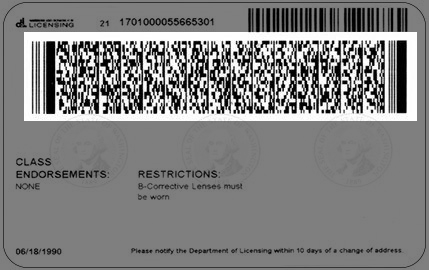
Click the folder with magnifying glass button when your photo is ready to be analyzed. A green check indicates success and your identity is confirmed. Red indicates your identity cannot be confirmed. If orange, take another photo that is more clear and contains the barcode as above.
Verify PIN
❷Enter the 6-digit PIN code you received via email or text message. You have 15 minutes to enter the correct PIN.